When an Indian business expands from one city to three, its organic search traffic rarely triples automatically. Many founders discover that ranking a single website across multiple towns requires a dedicated multi-location SEO strategy rather than simply adding town names to an existing homepage.
A recent industry analysis from Search Engine Land highlighted a growing reality: treating every branch with the exact same template fails because local search intent, competitor density, and customer vocabulary differ in every market. A diagnostic clinic in Kakinada competes against different regional hospitals than its new branch in Rajahmundry or Visakhapatnam. If your search strategy treats these two branches as identical, search engines will struggle to rank either one.
Whether you run retail stores, dental clinics, coaching academies, or logistics hubs across Andhra Pradesh or greater India, scaling your search presence requires a structured blueprint. Here is how to organize your website, your Google Business Profiles, and your local signals to dominate local search across all your locations.
The Core Challenge of Multi-Location SEO for Growing Businesses
The moment you operate out of more than one physical address, search engines evaluate your brand under two distinct lenses: brand authority and localized relevance. Brand authority helps your main domain earn trust, but localized relevance determines whether you show up in the top three Google Maps results when a customer searches for services near their home.
Most Indian small businesses stumble into one of two common traps when expanding:
- The Single-Page Trap: Shoving every address, phone number, and city name into the footer or contact page of a single website. Search engine crawlers cannot easily match a single page to multiple distinct geographic queries.
- The Duplicate Page Trap: Creating ten location pages that copy the exact same service text word-for-word, changing only the city name in the headline. Google identifies this as thin, doorway content and frequently filters these pages out of organic search results.
Solving these issues does not require complex enterprise software. It requires clear digital architecture and discipline across your listings and site structure.
Step 1: Set Up an Clean Website Architecture for Locations
Your website structure must make it effortless for both human visitors and search crawlers to navigate between regions. If you are updating your site architecture, coordinating with your website development team early will prevent costly technical cleanups later.
The most effective structure uses a dedicated location hub with individual sub-pages for every verified branch:
- Main Hub:
example.com/locations/(lists all regions, states, or cities with quick links). - Branch Landing Page:
example.com/locations/kakinada/ - Secondary Branch Landing Page:
example.com/locations/rajahmundry/
Avoid buying separate domain names for every city (such as clinic-kakinada.in and clinic-vizag.in). Splitting your brand across multiple domains dilutes your domain rating and forces you to build backlinks, citations, and trust from scratch for every single town. Keeping all locations on one unified domain lets every branch benefit from your overall domain strength.
Step 2: Build Truly Unique City Landing Pages
To succeed with multi-location SEO, each city page must provide genuine value to someone living in that specific area. If you simply copy-paste your service paragraphs across thirty city pages, search engines will disregard them.
Every dedicated location page should include:
- Exact NAP details: The precise Name, Address, and local Phone number for that branch, matched exactly to its Google Business Profile.
- Embedded Google Map: A direct map embed pointing specifically to that branch profile, not just the general city center.
- Branch-specific team details: Names, photographs, and qualifications of the doctors, branch managers, or lead technicians working at that location.
- Local landmarks and parking advice: Practical directions (for example, "Located opposite the RTC Complex, 200 meters past the main junction, with dedicated two-wheeler parking").
- Genuine local reviews: Testimonials from verified customers who visited that specific branch.
- Localized FAQs: Common questions regarding local payment modes, local operating hours, or regional holiday closures.
This level of local detail signals to search algorithms that the branch is an active, established part of the local community.
Step 3: Master Google Business Profile for Every Branch
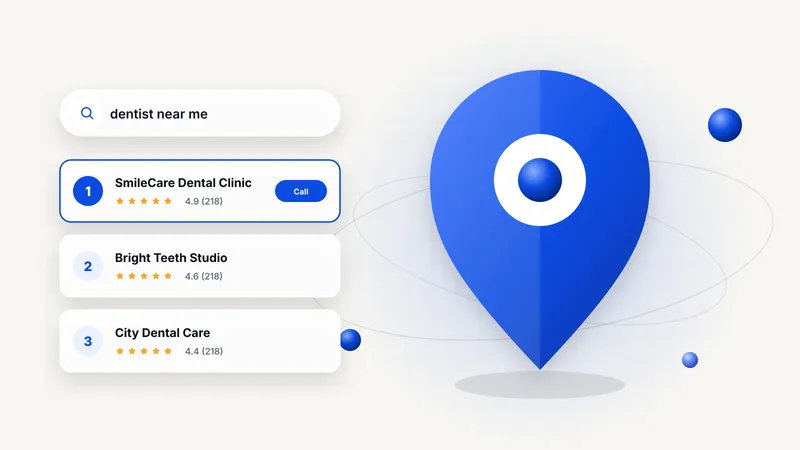
For service and retail businesses, the majority of high-intent local phone calls and direction requests come from the Google Local Map Pack. Having multiple branches means you must create and independently verify a separate Google Business Profile (GBP) for each physical address.
Follow these strict rules when managing multiple profiles:
- Maintain consistent brand naming: Use your real business name across all profiles without stuffing keywords or city names into the title. If your business is "Sri Lakshmi Diagnostics", keep the profile name as "Sri Lakshmi Diagnostics" for both Kakinada and Rajahmundry. Adding "Sri Lakshmi Diagnostics Best Blood Test Lab Rajahmundry" violates Google guidelines and risks suspension.
- Link directly to the branch landing page: Do not point every profile to your homepage. Set the website URL of the Kakinada profile to
example.com/locations/kakinada/. This creates a strong geographic link between the verified map pin and your on-page content. - Use local phone numbers: Whenever possible, provide a landline or dedicated mobile number with the local area code rather than a centralized national 1800 toll-free number. Local numbers reinforce geographic legitimacy.
- Keep operational hours accurate per branch: Different branches often observe different market holidays or local trading hours. Ensure each profile reflects real opening times.
Step 4: Implement LocalBusiness Schema Markup
Structured data helps search engines parse technical details about your locations with zero ambiguity. On each location page, your technical team should implement LocalBusiness (or specific sub-types like MedicalClinic, Store, or ProfessionalService) Schema markup.
Ensure your structured data includes:
- The exact branch name and physical street address.
- The geographic latitude and longitude coordinates.
- Local opening hours specification.
- The local direct telephone number.
- The URL of the branch page and primary service catalogue.
Implementing structured markup ensures search engines understand that these pages belong to the same parent organization while operating as independent physical service points. If you need help structuring your technical markup, exploring dedicated SEO and growth services can ensure your code adheres to current schema standards.
Step 5: Build Local Citations and Regional Links
Backlinks remain a primary ranking factor, but for multi-location SEO, geographic relevance is just as critical as overall domain authority. Generic national directory submissions provide diminishing returns.
Instead, focus on regional validation:
- Local business directories: Register each branch on reputable regional platforms, including Justdial, IndiaMART, Sulekha, and trade-specific industry directories. Ensure your NAP data matches your website letter-for-letter.
- Local community sponsorships: Sponsoring a neighborhood sports event, an educational seminar, or a regional trade conference often earns an authentic link from local news portals, college websites, or chamber of commerce directories.
- Local vendor partnerships: Feature case studies or testimonials for local suppliers you work with in that city, and request reciprocal partner mentions on their websites.
Review Generation: The Make-or-Break Ranking Signal
No amount of technical optimization can overcome a branch with poor review volume or weak ratings. Customer review velocity and sentiment directly impact how high your pin ranks on Google Maps.
Do not pool all your customer reviews onto your main website or social media profiles. Train branch managers and front-desk staff to ask satisfied customers for reviews using a short link or QR code that points specifically to that branch's Google Business Profile. Respond to every review promptly—both positive and negative—using respectful, natural language.
Common Pitfalls to Avoid in Multi-Location Campaigns
As you expand your reach across cities, watch out for these recurring mistakes:
Setting up virtual offices or fake addresses solely to appear in search results is one of the quickest ways to trigger a manual penalty from Google. If you do not have physical staff and legitimate signage at a location, do not list it as a storefront profile.
Similarly, avoid sending all paid search and social campaign traffic to a generic homepage. Whether you are running organic campaigns or paid multi-city promotions through broader digital marketing efforts, always direct local users to their nearest branch page to maximize conversion rates.
FAQ
How many locations do I need before implementing multi-location SEO?
You should implement multi-location SEO principles the moment you have two or more distinct physical addresses serving customers. Waiting until you have five or ten branches makes restructuring your website and citation profiles far more difficult.
Can I use the same phone number for all my branches?
While you can use a single centralized call center number, it is strongly recommended to provide a local direct phone number for each branch on both your website and its Google Business Profile. Local numbers serve as strong local relevance signals for search algorithms.
What should I do if two of my branches are in the same city?
Create separate landing pages for each branch focusing on specific neighborhood identifiers, postal codes, and prominent local landmarks. Clearly explain the geographic boundaries each branch serves so customers choose the nearest facility without confusion.
Should I write separate blog posts for each branch location?
Generally, no. Educational articles should live on your main blog to build domain-wide authority. Use location pages for branch-specific updates, local case studies, community involvement, and local operational announcements.
Scaling your business across multiple locations is an exciting milestone, but your digital footprint must keep pace with your physical footprint. If you want a tailored search strategy to grow your regional branches and dominate local map packs, contact our team at Aloits Technologies for a practical evaluation of your digital visibility.